Since 2.2.6.0 FW, the radio interface allows the use of ACM (Automatic Coding and Modulation) for PtP links – Transparent protocol and PtMP links – Flexible and BDP protocols. The radio channel is continuously measured and, depending on the transmission quality (data MSE and header MSE!), the highest possible transmission rate determined by the combination of Modulation and FEC is selected.
The ACM mechanism adapts the current modulation and coding to the signal quality of each individual radio link between stations. Specific modulation and coding pairs (profiles) are arranged so that the transmission channel capacity increases with increasing signal quality due to the gradual switching of ACM profiles. ACM works independently for each direction of the link. The signal quality measurement required for the ACM algorithm is performed on the receiver side. The signal quality information is delivered to the transmitter as an extension of the data packets. ACM therefore brings a certain overhead in addition to the transmitted data.
Implementation differences according to the type of radio protocol:
Transparent: ACM can be used with only 2 stations in the network, i.e. only for point-to-point communication.
Flexible: ACM is not limited by the network topology. It therefore also works in point-to-multipoint communication including multiple retranslations in a daisy-chain scenarios.
Base driven: ACM is not limited by the network topology. It therefore also works in point-to-multipoint communication including retranslations.
Configuration is very straight-forward.
Go to the Settings > Interfaces > Radio menu. Just under the part of Radio settings with frequencies, modulations, etc., enable the Adaptive coding and modulation (ACM) option. When enabled, the Modulation and FEC parameters selection is disabled. Modulation a FEC is controlled automatically by ACM. To enable ACM, you must have the corresponding SW key installed.
You just need to set three parameters.
Default profile | Initial and also minimum ACM profile. Depending on the current setting of the Modulation type parameter, the ACM selection box will offer profiles containing only FSK or QAM modulation. |
Best profile | Maximum ACM profile. Depending on the current setting of the Modulation type parameter, the ACM selection box will offer profiles containing only FSK or QAM modulation. The Best profile can be the same or higher than the Default profile. |
Fallback timeout | If no communication occurs on the monitored radio channel during this time
interval, the information about the status of this channel is declared obsolete and
the ACM is switched to the initial profile – the Default profile
value. |
Note that there are not ALL the combinations of modulations and FEC as you could select manually. For a proper operation, the MSE (not RSS) decision thresholds must be high enough so that the modulation does not flap all the time. Thus, the supported list of a combination of modulation and FEC are:
FSK:
2CPFSK 3/4
4CPFSK 3/4
4CPFSK 1/1
QAM:
DPSK 3/4
π/4DQPSK 3/4
16DEQAM 3/4
64QAM 3/4
256QAM 3/4
256QAM 5/6
Within our example, we used static settings:
Lowest modulation set: π/4DQPSK 3/4
Highest modulation set: 64QAM without FEC
Within our ACM settings, we can set the Default profile to π/4DQPSK 3/4, but we cannot set 64QAM without FEC. We can either set 64QAM 3/4 or 256QAM 3/4. The 2nd option is better, because 256QAM 3/4 has the same bitrate (125 kb/s, 25kHz channel) as the 64QAM without FEC. The sensitivity is even 1dB better!
Within all the protocols (Flexible, BDP, Transparent), enable the ACM in all the units. Only in BDP, it is then enough to configure the profiles, because the remotes are driven by the Base automatically.
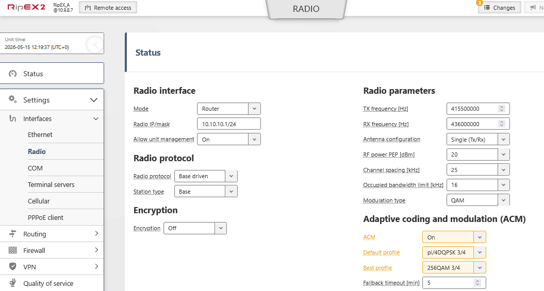
Just apply the changes and repeat this in all the remotes. Within the BDP, each remote has only the On/Off option enabled.
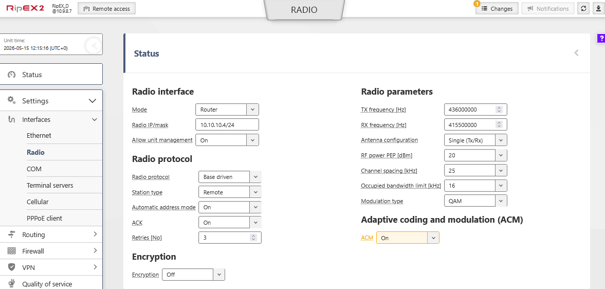
![[Note]](/images/radost/images/icons/note.png) | Note |
|---|---|
It is possible to combine units with and without enabled ACM. The communication with those without the ACM being enabled, will use the default profile (from the unit with enabled ACM). |
Last, but not least there are multiple parameters available in the Advanced menu only.
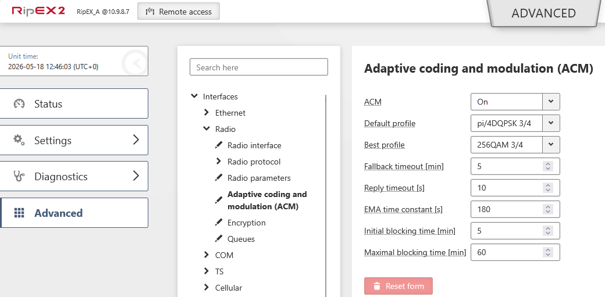
In most of the situations, you will not need to edit these values.
Once saved, try to ping among the units to see changes within the Status. This status can be opened within this Radio settings menu and can look similar to the following output:
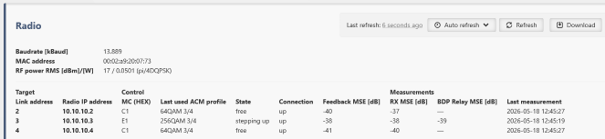
You can see individual lines for each neighbour/remote unit – Radio IP address and current ACM Profiles are displayed. These values are straight-forward. Let’s explain the other columns/values
State | Profile blocking state: “free” (not blocking), “stepping up” (stepping up the profile), “blocking” (blocking a profile that has lost connection) |
Connection | Peer connection status: “up” (answering), “down” (not answering) |
Feedback MSE [dB] | MSE [dB] returned in the last received feedback from the peer |
Measurements | RX MSE [dB] – Average MSE [dB] of frames on reception. Only filled if there are
enough samples for the average. |
The profile can go up just in individual steps, i.e. one profile after another – not multiple hops and not quickly one after another (after an increase, the other increase if blocked for a while). But if the MSE is too low, the current profile can skip multiple profiles going down.
There is a fallback timer running on the transmitter side that restarts when feedback is received from the receiver. If the link is not used for a long time (user traffic), the timer expires and the ACM switches to the default profile.
Feature: If there are no user packets or service data passing through, the ACM profile cannot be changed, because of missing link signal measurements. In the idle state, MSE measurement can be performed on selected control frames (BDP Base), but this is not enough to establish a connection between ACMs in stations.
The AcmFeedback and TraceRetr extensions are inserted into the DATAlr header and are listed in the radio’s physical layer monitoring when DATAlr listing is enabled (“Include headers” = “Data coding”, “Both”).
AcmFeedback | The listing of the extension includes the carried signal quality [dB] (MSE) and
the last used modulation and coding code (MC). |
TraceRetr | Added in the BDP protocol. |
Examples
BDP data frame with AcmFeedback extension (invalid MSE (not enough samples), last MC 0x01) and TraceRetr (unfilled):
10:58:05.974759 [RF:phy:rx] IP 10.10.1.44 > 10.10.1.11 ICMP echo reply id=0x0d8a seq=2, length:127, rss:-58 mse:-28
EXT_MEAS: mc:01 rss:-58 hdr_mse:-27 data_mse:-28 att1en:0 att2:0 freq_off:115 dig_dc_i:-16 dig_dc_q:-13 an_dc_i:4714 an_dc_q:5112 in_pck_bbp:-60 pre_rx: rss:-121 att1en:0 att2:0
RLHEAD: LINK 44 (10.10.1.44) > base (10.10.1.11): DATA_RTS: T:44 LN:8 Rp:- nA:y Ofr:0 raw: 6880 2c20 0743 0840
DHEAD: |F:-|C:-|E:-| AcmFeedback(mse:INV,mc:01) TraceRetr(-) raw: 8084 1453 c3c9 aacc 57af 11cb a8bd aebf cb11 40b2 9707 f705 0200 01Flexible data frame with AcmFeedback extension (average MSE -46dB, last MC 0x81):
08:17:21.914811 [RF:phy:rx] IP 10.10.1.22 > 10.10.1.11 ICMP echo reply id=0x01c5 seq=1, length:106, rss:-66 mse:-43
EXT_MEAS: mc:81 rss:-66 hdr_mse:-43 data_mse:-43 att1en:0 att2:0 freq_off:-104 dig_dc_i:-14 dig_dc_q:-15 an_dc_i:4691 an_dc_q:5106 in_pck_bbp:-68 pre_rx: rss:-119 att1en:0 att2:0
RLHEAD: LINK 200705 (10.10.1.22) > 2006E9 (10.10.1.11): FLEXIBLE: pri:0 LN:5 Rp:- nA:y raw: 6ea0 0120 06e9 2007 05
DHEAD: |F:-|C:-|E:-| AcmFeedback(mse:-46,mc:81) raw: 8005 022e 81